
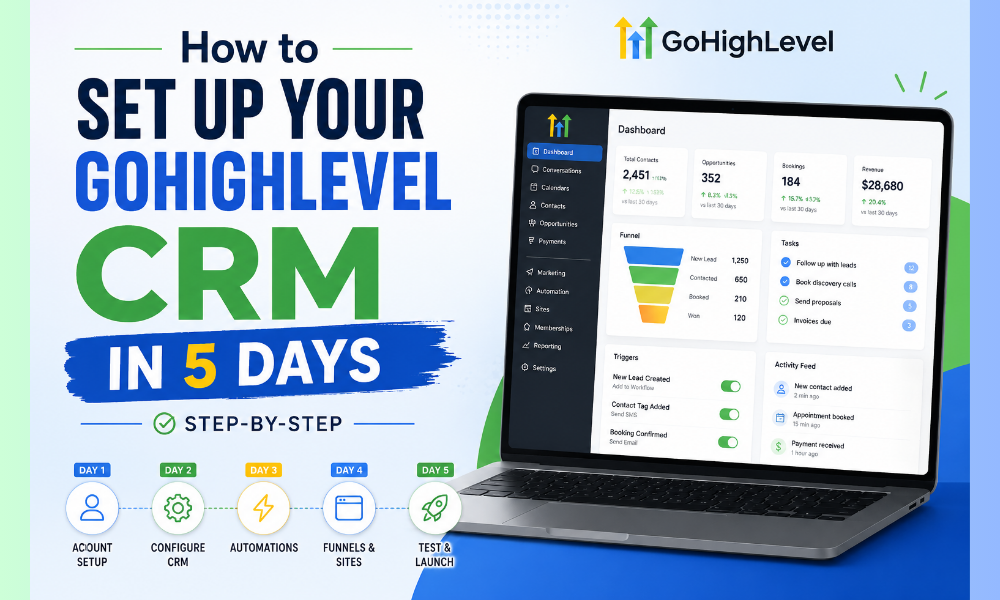
How to Set Up Your GoHighLevel CRM in 5 Days (Step-by-Step)
Setting up a CRM correctly is one of the most important steps for businesses looking to improve lead management, automate workflows, and scale customer communication efficiently. Many businesses invest in CRM platforms but struggle to organize their pipelines, automate follow-ups, and properly integrate their marketing systems.
GoHighLevel has become one of the most popular platforms for businesses and agencies because it combines CRM, automation, funnels, communication tools, and marketing systems into a single ecosystem.
A structured GHL CRM setup helps businesses centralize operations, improve customer experiences, and automate repetitive tasks that normally consume time and resources.
This step-by-step guide explains how businesses can set up their GoHighLevel CRM in five days while building a scalable system powered by GoHighLevel automation and optimized workflows.
Day 1: Planning Your CRM Structure and Business Workflow
The first day of a successful GHL CRM setup should focus on planning and organization rather than rushing directly into automation.
Before configuring the platform, businesses need to understand their customer journey, sales process, and operational goals.
This includes identifying:
Lead sources
Customer stages
Sales workflows
Communication channels
Follow-up processes
A clear workflow structure helps businesses create CRM systems that align with real operational needs rather than generic templates.
Many companies work with a GHL Virtual Assistant during this phase to organize workflows, map customer journeys, and prepare data for migration into the CRM system.
Planning properly during the first stage reduces future complexity and improves long-term scalability.
Organizing Pipelines and Lead Stages
A CRM system becomes much more effective when pipelines are clearly organized.
Businesses should create sales stages that reflect how leads move through the buying process.
For example:
New lead
Qualified lead
Consultation scheduled
Proposal sent
Closed customer
This structure improves visibility and helps teams track customer progress more effectively.
A properly organized pipeline is one of the foundations of successful goHighLevel automation because workflows and triggers depend heavily on pipeline organization.
Businesses using advanced GoHighLevel expert services often build customized pipelines designed specifically for their industry and sales cycle.
Day 2: Importing Contacts and Configuring CRM Settings
The second day should focus on importing contacts and configuring core CRM settings.
Businesses migrating from spreadsheets or other CRM systems should clean and organize contact data before importing it into GoHighLevel.
This includes removing duplicates, updating missing information, and segmenting contacts based on lead type or customer status.
A clean CRM database improves automation accuracy and customer communication quality.
Companies often use a GHL Virtual Assistant to manage contact imports, organize tags, and configure CRM fields efficiently during setup.
This stage also includes configuring business settings, such as:
Email domains
Phone integrations
User permissions
Notifications
Calendars
Proper configuration ensures smoother operations and better workflow management later in the process.
Setting Up Smart Tags and Segmentation
Segmentation is one of the most important parts of CRM organization.
Tags help businesses categorize leads based on behavior, source, interests, or customer stage.
For example, businesses may create tags for:
Website leads
Consultation requests
Cold prospects
Returning customers
This organization allows businesses to create more personalized communication and automated workflows.
A structured GHL CRM setup uses segmentation strategically to improve targeting and workflow efficiency.
Businesses working with providers offering goHighLevel expert services often create advanced tagging systems that improve reporting, lead management, and automation performance.
Day 3: Building Funnels and Lead Capture Systems
The third day should focus on creating lead generation infrastructure inside GoHighLevel.
One of the platform’s strongest features is its built-in Funnel Builder, which allows businesses to create landing pages, sales funnels, and lead capture systems without relying on multiple external tools.
Businesses can use funnels to:
Generate leads
Book consultations
Promote services
Capture customer information
A well-designed funnel helps businesses move prospects smoothly through the customer journey while integrating directly into CRM workflows.
Companies implementing GoHighLevel automation often connect funnel submissions directly to pipelines, nurturing sequences, and follow-up systems.
This creates seamless lead management and reduces manual work.
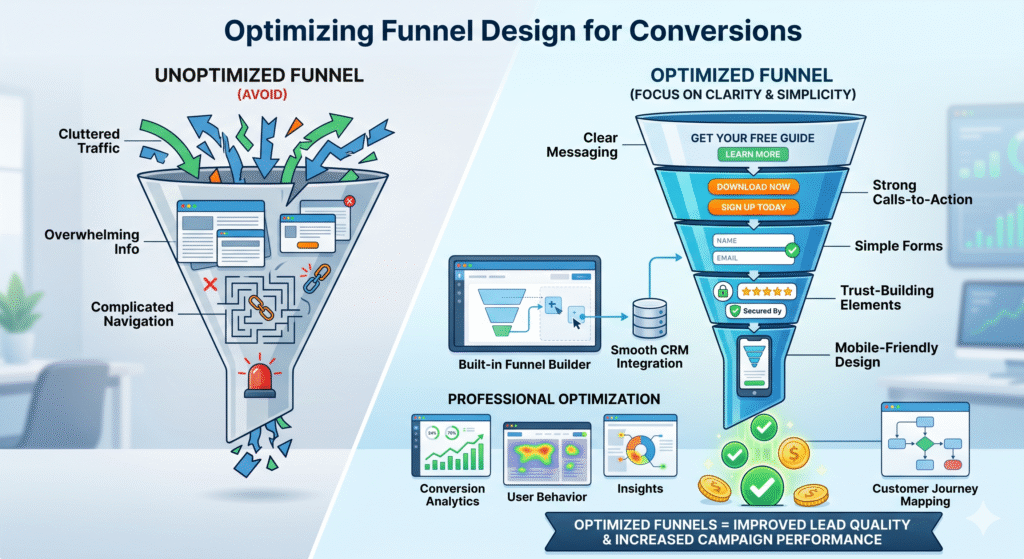
Optimizing Funnel Design for Conversions
A successful funnel should focus on clarity, simplicity, and conversion optimization.
Businesses should avoid overwhelming visitors with too much information or complicated navigation.
Instead, funnel pages should include:
Clear messaging
Strong calls-to-action
Simple forms
Trust-building elements
Mobile-friendly design
The built-in Funnel Builder allows businesses to customize layouts while maintaining smooth CRM integration.
Organizations using professional gohighlevel expert services often optimize funnels based on user behavior, conversion analytics, and customer journey mapping.
Optimized funnels improve lead quality and increase overall campaign performance.
Day 4: Setting Up Automation Workflows
The fourth day is when automation becomes the center of the CRM system.
Automation workflows help businesses reduce repetitive tasks and improve response speed.
With GoHighLevel automation, businesses can create workflows that automatically:
Send follow-up emails
Trigger SMS reminders
Assign leads to pipelines
Schedule appointments
Notify team members
For example, when a lead submits a funnel form, the system can instantly send a welcome message, assign the lead to a pipeline stage, and schedule follow-up communication automatically.
Businesses frequently rely on a GHL Virtual Assistant to configure workflows and test automation systems during setup.
Properly configured workflows improve operational efficiency and customer engagement.
Creating Automated Lead Nurturing Sequences
Not every lead converts immediately. Many prospects require ongoing communication before making purchasing decisions.
Lead nurturing automation helps businesses stay connected with prospects consistently.
Businesses can create automated sequences that deliver:
Educational content
Appointment reminders
Testimonials
Special offers
Follow-up messages
This keeps leads engaged while reducing manual outreach requirements.
A strong GHL CRM setup uses nurturing workflows strategically to improve conversion rates and customer relationships over time.
Companies using advanced GoHighLevel expert services often create personalized automation journeys tailored to different customer segments.
Day 5: Testing, Optimization, and Reporting Setup
The final day should focus on testing the entire CRM system and optimizing workflows before full deployment.
Businesses should verify that:
Funnels are functioning correctly
Automation triggers are working
Lead assignments are accurate
Emails and SMS campaigns are delivered properly
Pipeline movements are updating automatically
Testing helps identify workflow issues before they affect customer experiences.
This stage also includes setting up reporting dashboards and analytics tools inside GoHighLevel.
With proper reporting systems, businesses can monitor:
Lead generation performance
Conversion rates
Pipeline activity
Campaign effectiveness
Businesses using professional goHighLevel expert services often configure custom dashboards designed to track the most important KPIs for business growth.
Why Automation Is Critical for Modern CRM Systems
Modern businesses can no longer rely heavily on manual customer management processes.
As lead volume increases, manual workflows often create delays, inconsistencies, and missed opportunities.
Automation solves these challenges by creating systems that operate consistently and efficiently.
With GoHighLevel automation, businesses can streamline communication, improve lead management, and reduce operational workload.
Automation also improves customer experiences because leads receive faster and more personalized responses.
The Role of a GHL Virtual Assistant in CRM Setup
Many businesses choose to work with a GHL Virtual Assistant during CRM implementation because setting up workflows, pipelines, funnels, and automation systems can become time-consuming.
A virtual assistant can help businesses:
Configure CRM settings
Import and organize contacts
Build automation workflows
Create funnel pages
Manage testing and optimization
This support allows businesses to implement GoHighLevel faster while reducing setup errors and operational complexity.
Why Businesses Invest in GoHighLevel Expert Services
Although GoHighLevel offers powerful features, many businesses struggle to maximize the platform without expert guidance.
This is why organizations increasingly invest in goHighLevel expert services to help design scalable CRM systems and advanced automation strategies.
Experts can customize workflows, optimize funnels, improve reporting systems, and align CRM structures with business goals.
Professional setup and optimization often lead to better performance, stronger automation efficiency, and higher conversion rates.
A successful GHL CRM setup requires more than simply creating pipelines and importing contacts. Businesses need a structured system that combines CRM organization, automation, funnels, communication workflows, and reporting into one scalable ecosystem.
By following a structured five-day setup process, businesses can build efficient CRM systems that improve lead management, customer engagement, and operational performance.
Common Mistakes Businesses Make During GHL CRM Setup
Many businesses invest in GoHighLevel but fail to achieve strong results because the CRM is not configured strategically.
One of the most common mistakes is overcomplicating workflows during the initial setup phase. Businesses often create too many automation triggers, unnecessary pipeline stages, or disconnected communication systems that become difficult to manage.
Another major issue is poor segmentation and inconsistent lead organization. Without proper tagging and categorization, automation systems become less effective, and customer experiences become fragmented.
A successful GHL CRM setup should focus on simplicity, scalability, and alignment with actual business processes rather than trying to automate everything immediately.
Businesses that use professional goHighLevel expert services often avoid these problems because workflows are designed strategically from the beginning.
Why Funnel Integration Improves CRM Performance
One of the biggest advantages of GoHighLevel is the ability to connect sales funnels directly with CRM workflows.
Traditional systems often require multiple external tools for landing pages, lead capture, automation, and customer management. This creates operational complexity and disconnected customer experiences.
The built-in Funnel Builder allows businesses to centralize these functions into one platform.
When a lead submits a form through a funnel, the CRM can instantly:
Create a contact record
Assign pipeline stages
Trigger automation workflows
Send follow-up communication
Notify sales teams
This level of integration improves efficiency and creates smoother customer journeys.
Companies using advanced GoHighLevel automation systems often achieve faster response times and stronger lead conversion performance because all processes operate within one connected ecosystem.
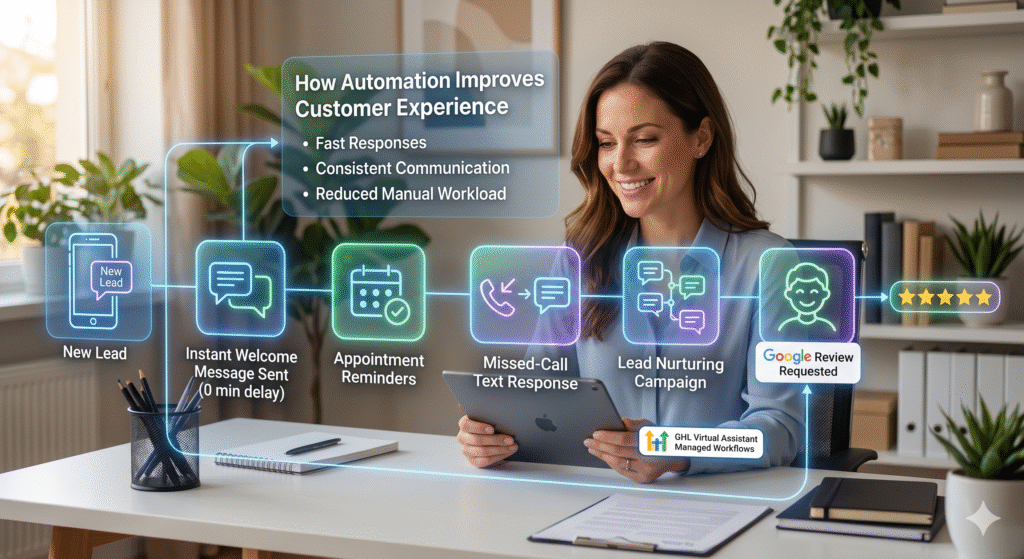
How Automation Improves Customer Experience
Modern customers expect fast responses and personalized communication throughout the buying process.
Manual follow-up systems often create delays, missed messages, and inconsistent experiences.
Automation helps businesses solve this challenge by ensuring that leads receive immediate engagement and structured communication.
For example, businesses can automate:
Welcome messages
Appointment reminders
Missed-call text responses
Lead nurturing campaigns
Review requests
With properly configured GoHighLevel automation, businesses can maintain consistent communication without increasing manual workload.
Organizations working with a GHL Virtual Assistant often create customer experience workflows designed to improve responsiveness while reducing operational pressure on internal teams.
The Importance of CRM Reporting and Analytics
A CRM system becomes much more valuable when businesses actively use reporting and analytics to improve performance.
GoHighLevel provides reporting features that allow businesses to monitor:
Lead generation performance
Pipeline conversion rates
Campaign engagement
Appointment booking trends
Automation effectiveness
These insights help businesses identify operational bottlenecks and optimize customer journeys more effectively.
A well-structured GHL CRM setup should include reporting dashboards that track key performance indicators aligned with business goals.
Companies using professional gohighlevel expert services often build custom reporting systems that provide deeper visibility into sales and marketing performance.
Why Businesses Need Ongoing CRM Optimization
CRM setup is not a one-time process. As businesses grow, workflows, customer behavior, and operational requirements continue evolving.
This means CRM systems require continuous optimization and refinement.
Businesses should regularly review:
Automation performance
Pipeline structure
Lead response timing
Customer engagement rates
Conversion performance
Continuous optimization ensures that the CRM remains aligned with changing business needs.
Organizations working with a GHL Virtual Assistant often maintain ongoing workflow updates and automation improvements to keep systems efficient and scalable over time.
Using GoHighLevel for Appointment Automation
Appointment scheduling is one of the most powerful automation opportunities inside GoHighLevel.
Manual scheduling often creates delays, missed follow-ups, and administrative inefficiencies.
GoHighLevel allows businesses to automate the entire appointment process, including:
Booking confirmations
Calendar synchronization
SMS reminders
Email reminders
Follow-up workflows
With goHighLevel automation, businesses can reduce no-show rates and improve customer communication before and after appointments.
Businesses using the built-in Funnel Builder often connect appointment forms directly with CRM pipelines and nurturing systems to create seamless scheduling experiences.
Scaling Your Business With CRM Automation
As businesses grow, manual customer management becomes increasingly difficult to maintain.
Automation allows companies to scale operations without dramatically increasing workload or staffing requirements.
With a properly structured GHL CRM setup, businesses can manage larger lead volumes, automate communication, and streamline customer journeys while maintaining personalized experiences.
This scalability is one of the main reasons why GoHighLevel has become popular among agencies, service providers, and growing businesses.
Companies investing in GoHighLevel expert services often focus on building scalable systems designed to support long-term operational growth.
Why CRM Centralization Matters for SMEs
Many small and medium-sized businesses struggle because customer information is spread across multiple tools and disconnected systems.
This creates inefficiencies, inconsistent communication, and limited visibility into customer activity.
GoHighLevel solves this problem by centralizing CRM management, communication, automation, and funnel systems into one platform.
A centralized GHL CRM setup improves organization, reporting accuracy, and operational efficiency.
Businesses working with a GHL Virtual Assistant frequently streamline operations significantly by consolidating systems into a single CRM ecosystem.
Future Trends in GoHighLevel Automation
Automation technology continues evolving rapidly, and GoHighLevel is expected to integrate more advanced AI-driven capabilities in the future.
Future automation trends may include:
Predictive lead scoring
AI-powered customer segmentation
Intelligent follow-up recommendations
Behavior-based automation triggers
Advanced conversational AI integration
Businesses that adopt automation early will be better positioned to compete in increasingly digital and customer-focused markets.
Companies leveraging advanced goHighLevel automation strategies today are already preparing for the next stage of intelligent CRM management.