
Workflow Templates Every Small Business Needs
Why Small Businesses Struggle Without Workflows (And Why Templates Matter More Than Tools)
Most small businesses don’t fail because they lack demand. They fail because their operations cannot handle growth.Leads increase.Customers increase.Messages increase.
And suddenly:
- Follow-ups are missed
- Customers feel ignored
- Teams feel overwhelmed
- Owners feel stuck
At the center of this breakdown is a simple truth:Most small businesses run on memory instead of systems.This section explores why workflows are essential, why small businesses resist them, and why workflow templates — not just software — are the foundation of sustainable growth.
What a Workflow Really Is (And What It Is Not)
A workflow is not:
- A complicated automation
- A rigid corporate process
- A replacement for human judgment
A workflow is:
- A repeatable sequence of actions
- Triggered by a specific event
- Designed to achieve a predictable outcome
Examples:
- What happens when a lead fills out a form
- What happens when a call is missed
- What happens after a customer books
- What happens after a sale is completedWithout workflows, outcomes depend on chance.With workflows, outcomes become predictable.
Why Small Businesses Resist Workflows
Despite their value, many small businesses avoid workflows because they believe:
- “We’re too small.”
- “We handle things personally.”
- “Workflows are for big companies.”
- “We don’t want to sound automated.”
Ironically, these same businesses struggle with:
- Inconsistency
- Burnout
- Missed revenueWorkflows don’t remove personalization — they protect it by removing chaos.
The Hidden Cost of Operating Without Workflow Templates
When workflows are not defined, small businesses pay invisible costs:
- Missed OpportunitiesLeads fall through cracks. Follow-ups don’t happen.
- Inconsistent Customer ExperienceDifferent customers receive different treatment.
- Team ConfusionNo one is sure what happens next — or who owns what.
- Owner DependencyEverything depends on the owner’s memory and availability.These costs compound over time.
Why Workflow Templates Matter More Than Custom Builds
Many small businesses think they need custom workflows for everything. In reality, most businesses face the same operational scenarios.Workflow templates exist because:
- Common problems repeat
- Proven solutions already exist
- Reinventing workflows wastes time
Templates provide:
- Speed
- Reliability
- Best practicesCustomization comes later — structure comes first.
The Difference Between Random Automation and Strategic Workflows
Random automation:
- Sends messages without context
- Creates noise
- Confuses customers
Strategic workflows:
- Guide customers intentionally
- Reduce friction
- Improve experienceThe difference lies in excellent design, not technology.
Why Workflows Are the Backbone of Scale
Scaling a business means:
- Doing more without losing quality
- Handling volume without burnoutThis is impossible without workflows.
Workflows allow businesses to:
- Maintain consistency
- Reduce manual effort
- Protect customer experienceGrowth without workflows creates chaos.Workflows turn growth into leverage.
Where Most Small Businesses Get Workflows Wrong
Common mistakes include:
- Overcomplicating workflows
- Automating too aggressively
- Ignoring edge cases
- Never updating workflowsThese mistakes lead to frustration and abandonment.This is why many businesses rely on professional goHighLevel services — workflows require experience, not just setup.
Why GoHighLevel Is Ideal for Workflow-Driven Businesses
GoHighLevel is designed around workflows — not disconnected features.It allows small businesses to:
- Trigger workflows from real events
- Combine CRM, communication, and automation
- Build end-to-end processesBut the platform alone is not enough.Templates and strategy unlock its value.
Workflow Templates as a Growth Shortcut
Templates compress learning curves.Instead of asking:
- “What should happen next?”
- “Did we forget something?”
- “Who follows up?”Templates answer these questions automatically.This free updates mental space — one of the most valuable resources in a small business.
Why Experience Matters in Workflow Design
A workflow that looks good on paper can fail in practice.Experienced gohighlevel experts understand:
- Where workflows break
- When automation should pause
- How customers actually behaveThis experience prevents costly mistakes.
The Categories of Workflows Every Small Business Needs
Almost every small business needs workflows in these areas:
- Lead capture & follow-up.
- Booking & appointments
- Sales pipeline management
- Customer onboarding
- Retention & re-engagement
- Internal task coordinationThe difference between struggling and scaling businesses is whether these workflows exist.
The Essential Workflow Templates Every Small Business Should Implement (And Why They Work)
Why “Essential” Workflows Are Industry-AgnosticWhile industries differ, operational needs are remarkably similar.Every small business must:
- Respond to leads
- Book conversations
- Deliver services
- Retain customersThis section outlines core workflow templates that work across industries — and explains why they matter.
New Lead Intake & Instant Follow-Up Workflow
Trigger: Lead submits a form, sends a message, or calls.What This Workflow Does:
- Instantly acknowledges the lead
- Sends a confirmation message
- Assigns the lead to the right pipeline
- Alerts the team
Why It Matters:Speed builds trust. Silence kills momentum.Businesses using this workflow:
- Respond faster
- Convert more leads
- Appear more professionalThis is one of the highest-ROI workflows available.
Missed Call Text-Back Workflow
Trigger: Incoming call is missed.What This Workflow Does:
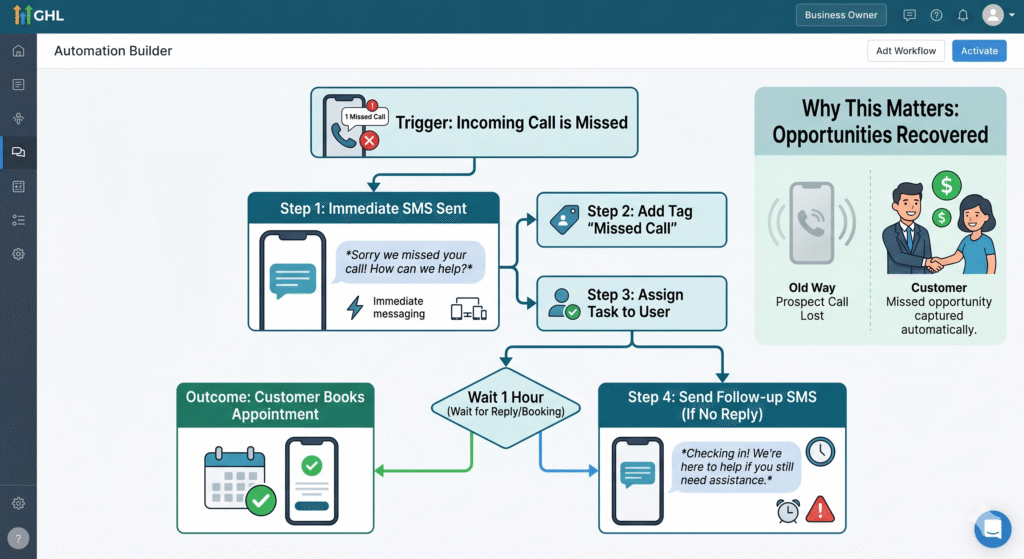
- Sends an immediate text fully responsive
- Provides a booking option
- Initiates follow-up if no replyWhy It Matters:Most callers don’t call back.This workflow recovers lost opportunities automatically.
Appointment Booking & Confirmation Workflow
Trigger: Appointment is booked.What This Workflow Does:
- Sends confirmation
- Sets expectations
- Sends reminders
- Reduces no-showsWhy It Matters:No-shows are rarely a lead problem — they’re a workflow problem.This template dramatically improves attendance.
Pre-Appointment Nurture Workflow
Trigger: Appointment booked but not yet attended.What This Workflow Does: Learn more about our GHL CRM setup service.
- Educates the prospect
- Builds confidence
- Prepares them for the conversationWhy It Matters:Prepared prospects convert at higher rates.
Sales Pipeline Stage Movement Workflow
Trigger: Lead moves to a new pipeline stage.What This Workflow Does:
- Triggers relevant follow-ups
- Assigns tasks
- Adjusts communicationWhy It Matters:Sales momentum depends on timely action.This workflow keeps deals moving.
Post-Sale Onboarding Workflow
Trigger: Deal is marked “won.”What This Workflow Does:
- Welcomes the customer
- Sets expectations
- Delivers onboarding content
- Introduces next stepsWhy It Matters:Post-sale silence creates buyer’s remorse.This workflow builds confidence and retention.
Customer Check-In Workflow
Trigger: Time-based after purchase.What This Workflow Does:
- Checks customer satisfaction
- Addresses issues early
- Reinforces valueWhy It Matters:Retention is cheaper than acquisition.This workflow protects long-term revenue.
Re-Engagement Workflow for Cold Leads
Trigger: Lead becomes inactive.What This Workflow Does:
- Re-opens conversations
- Offers value
- Identifies renewed interestWhy It Matters:Many “lost” leads are simply unready, not uninterested.
Internal Task Assignment Workflow
Trigger: Specific lead or customer action.What This Workflow Does:
- Assigns internal tasks
- Notifies team members
- Creates accountabilityWhy It Matters:Growth breaks down when teams lack clarity.
Review & Feedback Collection Workflow
Trigger: Successful outcome or milestone.What This Workflow Does:
- Requests feedback
- Collects reviews
- Identifies advocatesWhy It Matters:Social proof drives future growth.
Why Templates Must Be Adapted — Not Blindly Used
Templates are starting points — not final answers.They must be: Our GoHighLevel automation specialists build these workflows end-to-end. Our GoHighLevel small business solutions are built to scale with you.
- Aligned with your offer
- Adjusted to your tone
- Tested and refinedThis is where professional gohighlevel services add value.
Why DIY Workflow Builds Often Stall
Many businesses start strong but stop because:
- Complexity increases
- Workflows overlap
- Errors appearAt this stage, many choose to hire gohighlevel experts — not because they failed, but because growth demands precision.
How Experts Turn Templates Into Systems
Experienced gohighlevel experts:
- Simplify logic
- Reduce friction
- Prevent over-automation
- Optimize performanceTemplates become systems, not scripts.
Workflow Templates as a Competitive Advantage
Most small businesses still rely on:
- Memory
- Manual follow-ups
- Ad-hoc processes
Businesses with workflows:
- Respond faster
- Deliver consistency
- Scale without stressSystems quietly outperform effort.
Workflows Turn Effort Into Leverage
Hard work alone does not scale.Systems do.Workflow templates give small businesses:
- Structure
- Predictability
- ControlGoHighLevel provides the platform.Turning Workflow Templates Into a Scalable Operating System for Small Businesses
Why Workflow Templates Alone Are Not Enough
Many small businesses reach an important milestone when they first implement workflow templates. Leads are automatically followed up on, bookings run more smoothly, and internal confusion decreases. For a while, everything feels easier.Then growth happens.More leads come in.More offers are added.More team members get involved.And suddenly, workflows that once worked perfectly start to feel fragile.This is a critical moment. It reveals an important truth:Workflow templates are the foundation — not the finish line.To truly support long-term growth, workflows must evolve from isolated automations into a connected operating system for the business.
The Concept of an “Operating System” for Small Businesses
Large companies rely on documented processes, departments, and layers of management. Small businesses don’t have that luxury. They rely on speed, flexibility, and focus.A workflow-driven operating system replaces bureaucracy with clarity.It defines:
- What happens
- When it happens
- Who owns it
- What is the next step isWithout requiring constant oversight from the owner.When workflow templates are intentionally connected, the business runs on systems rather than stress.
How Workflow Templates Connect Across the Business Lifecycle
High-performing small businesses do not treat workflows as standalone tools. They connect them across the entire lifecycle:
- Lead intake flows into booking workflows
- Booking workflows trigger sales workflows
- Sales workflows trigger onboarding workflows
- Onboarding workflows feed retention workflowsEach workflow hands off context to the next.This continuity is what transforms automation from convenience into leverage.
The Danger of Workflow Sprawl (And How to Avoid It)
One of the most common long-term problems small businesses face is workflow sprawl.This happens when:
- New workflows are added reactively
- Old workflows are never retired
- Logic overlaps and conflictsSymptoms include:
- Duplicate messages
- Confusing customer experiences
- Automation firing at the wrong timeWorkflow sprawl is not caused by too much automation — it’s caused by a lack of governance.
Why Governance Matters Even for Small Teams
Governance does not mean bureaucracy. It means:
- Clear ownership
- Clear purpose
- Clear documentation
Every workflow should have:
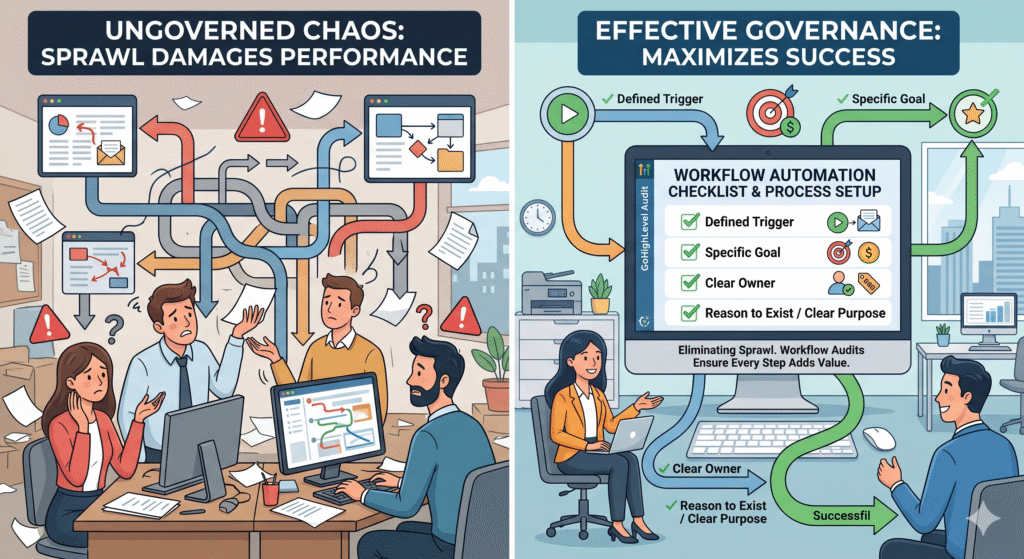
- A defined trigger
- A specific goal
- A clear owner
- A reason to existProfessional gohighlevel services often include workflow audits specifically to eliminate sprawl before it damages performance.
Automation Debt: The Silent Growth Killer
Just as technical debt in software builds quietly, automation debt does too.It occurs when:
- Quick fixes replace thoughtful design
- Temporary workflows become permanent
- No one revisits old logic
Automation debt leads to:
- Reduced flexibility
- Increased errors
- Fear of making changesThe solution is not removing automation — it’s intentional simplification.
How to Stress-Test Workflow Templates as You Grow
Before workflows can support scale, they must be stress-tested.Key questions small businesses should ask:
- What happens if lead volume doubles?
- What if a team member is unavailable?
- What if a customer skips a step?
- What if multiple workflows trigger at once?Experienced gohighlevel experts design workflows with these edge cases in mind — preventing failures before they happen.
Workflow Templates and Team Alignment
One of the biggest advantages of workflow templates is the clarity they provide internally.When workflows are well-designed:
- Team members know exactly what happens next
- Responsibility is clear
- Hand-offs are smoothThis reduces internal friction and prevents errors caused by assumptions.Workflows become a shared language inside the business.
Reducing Owner Dependency Through Workflows
Many small businesses are owner-dependent:
- The owner approves everything
- The owner remembers everything
- The owner fixes everything
Workflow templates reduce this dependency by:
- Automating decisions
- Standardizing actions
- Creating predictable outcomesThis allows owners to step out of day-to-day execution without losing control.
Using Workflow Data to Improve Operations
One overlooked benefit of workflows is the data they generate.When workflows are structured properly, small businesses can see:
- Where leads stall
- Which steps take the longest
- Where customers disengage
- Which processes convert bestThis transforms workflows into diagnostic tools, not just automation.With expert GoHighLevel services, this data is used to continuously refine operations.
The Role of Human Judgment Inside Automated Systems
The best workflows do not eliminate human judgment — they support it.High-performing systems: Book a free consultation →
- Automate routine actions
- Surface exceptions for human review
- Pause automation when conversations beginThis “human-in-the-loop” approach preserves flexibility while maintaining consistency.
Why Over-Automation Damages Customer Experience
Small businesses sometimes equate maturity with complexity.They add:
- More messages
- More steps
- More triggersBut complexity does not equal sophistication.
Customers experience:
- Message fatigue
- Confusion
- Reduced trustSophisticated workflow systems focus on clarity, timing, and relevance — not volume.
When to Customize Workflow Templates (And When Not To)
Not every workflow needs customization.Templates should be customized when:
- Your sales cycle is unique
- Your offer requires education
- Your customer expectations differ
Templates should not be customized when:
- You’re solving a common problem
- You lack performance data
- You’re early in implementationPremature customization often causes more harm than good.
Why Expertise Accelerates Workflow ROI
Small businesses often ask:“Why not just use templates ourselves?”The answer lies in time and risk.Experienced gohighlevel experts:
- Know which templates work best
- Avoid common pitfalls
- Optimize workflows faster
- Prevent automation debtHiring experts compresses years of trial-and-error into weeks.This is why growing businesses choose to hire gohighlevel experts — not because templates are hard, but because growth is unforgiving.
Workflow Templates as a Competitive Moat
Most small businesses still rely on:
- Manual follow-ups
- Informal processes
- Ad-hoc decision-making
Businesses with workflow-driven operations:
- Respond faster
- Deliver consistency
- Scale smoothlyOver time, these advantages compound and become difficult for competitors to replicate.
Scaling Offers Without Rebuilding Everything
One of the biggest benefits of well-structured workflows is modularity.When templates are designed properly:
- New offers user friendly existing workflows
- New channels plug into existing systems
- Growth doesn’t require rebuilding from scratchThis allows small businesses to experiment and expand safely.
Workflow Templates and Brand Consistency
Brand is not just design and messaging — it is experience.Workflow templates ensure:
- Consistent tone
- Predictable responses
- Professional interactionsEvery automated action reinforces the brand promise.
Long-Term Workflow Maintenance: The Missing Discipline
High-performing small businesses schedule:
- Workflow reviews
- Performance analysis
- Optimization cyclesAutomation is treated as infrastructure — not a one-time project.This discipline prevents decay and protects performance.
Ready to implement this in your GHL account?
Book a free 45-minute strategy call. Our certified GoHighLevel specialists will audit your setup.
Get Your GHL Setup Done Right
Free 45-min audit call — zero cost, no commitment.
Our GHL Services
- GHL CRM Setup
- GHL Virtual Assistant
- Funnel Builder
- Automation Specialist
- White-Label SaaS
- GHL Migration
Popular Posts
- High-Converting GHL Sales Funnel
- GHL Automation Templates
- GHL Pipeline Management